
202 lines
10 KiB
Markdown
202 lines
10 KiB
Markdown
<div align="center">
|
||
|
||
## 🎉 正在参加 Gitee 2025 最受欢迎开源软件评选
|
||
|
||
<a href="https://gitee.com/activity/2025opensource?ident=I6VXEH" target="_blank">
|
||
<img src="https://img.shields.io/badge/VUE3--ELEMENT--ADMIN-点击投票支持-f97316?style=for-the-badge&logo=gitee&logoColor=white&labelColor=111827" alt="投票" height="50"/>
|
||
</a>
|
||
|
||
<p>
|
||
<strong>📢 投票最后1天!恳请助力一票 🙏 无需重复投,您的支持是我们前行的最大动力!</strong>
|
||
</p>
|
||
|
||
</div>
|
||
|
||

|
||
|
||
<div align="center">
|
||
<img alt="logo" width="100" height="100" src="https://foruda.gitee.com/images/1733417239320800627/3c5290fe_716974.png">
|
||
<h2>youlai-boot</h2>
|
||
<img alt="有来技术" src="https://img.shields.io/badge/Java -17-brightgreen.svg"/>
|
||
<img alt="有来技术" src="https://img.shields.io/badge/SpringBoot-3.5.6-green.svg"/>
|
||
<a href="https://gitcode.com/youlai/youlai-boot" target="_blank">
|
||
<img alt="有来技术" src="https://gitcode.com/youlai/youlai-boot/star/badge.svg"/>
|
||
</a>
|
||
<a href="https://gitee.com/youlaiorg/youlai-boot" target="_blank">
|
||
<img alt="有来技术" src="https://gitee.com/youlaiorg/youlai-boot/badge/star.svg"/>
|
||
</a>
|
||
<a href="https://github.com/haoxianrui/youlai-boot" target="_blank">
|
||
<img alt="有来技术" src="https://img.shields.io/github/stars/haoxianrui/youlai-boot.svg?style=social&label=Stars"/>
|
||
</a>
|
||
<br/>
|
||
<img alt="有来技术" src="https://img.shields.io/badge/license-Apache%20License%202.0-blue.svg"/>
|
||
<a href="https://gitee.com/youlaiorg" target="_blank">
|
||
<img alt="有来技术" src="https://img.shields.io/badge/Author-有来开源组织-orange.svg"/>
|
||
</a>
|
||
</div>
|
||
|
||

|
||
|
||
<div align="center">
|
||
<a target="_blank" href="https://vue.youlai.tech/">🖥️ 在线预览</a> | <a target="_blank" href="https://youlai.blog.csdn.net/article/details/145178880">📑 阅读文档</a> | <a target="_blank" href="https://www.youlai.tech/youlai-boot">🌐 官网</a>
|
||
</div>
|
||
|
||
## 📢 项目简介
|
||
|
||
基于 JDK 17、Spring Boot 3、Spring Security 6、JWT、Redis、Mybatis-Plus、Vue
|
||
3、Element-Plus 构建的前后端分离单体权限管理系统。
|
||
[Mybatis-Flex 版本](https://gitee.com/youlaiorg/youlai-boot-flex)
|
||
|
||
- **🚀 开发框架**: 使用 Spring Boot 3 和 Vue 3,以及 Element-Plus 等主流技术栈,
|
||
实时更新。
|
||
|
||
- **🔐 安全认证**: 基于 Spring Security 6 原生架构,集成 JWT 令牌自动续期(无状
|
||
态)和 Redis 会话多端互斥管理(实时强制离线)双重认证机制,构建企业级身份安全
|
||
中枢。
|
||
|
||
- **🔑 权限管理**: 基于 RBAC 模型,实现细粒度的权限控制,涵盖接口方法和按钮级别
|
||
。
|
||
|
||
- **🛠️ 功能模块**: 包括用户管理、角色管理、菜单管理、部门管理、字典管理等功能。
|
||
|
||
## 🌈 项目源码
|
||
|
||
| 项目类型 | Gitee | Github | GitCode |
|
||
| -------------- | ---------------------------------------------------------------------- | ------------------------------------------------------------------------ | --------------------------------------------------------------------- |
|
||
| ✅ Java 后端 | [youlai-boot](https://gitee.com/youlaiorg/youlai-boot) | [youlai-boot](https://github.com/haoxianrui/youlai-boot) | [youlai-boot](https://gitcode.com/youlai/youlai-boot) |
|
||
| vue3 前端 | [vue3-element-admin](https://gitee.com/youlaiorg/vue3-element-admin) | [vue3-element-admin](https://github.com/youlaitech/vue3-element-admin) | [vue3-element-admin](https://gitcode.com/youlai/vue3-element-admin) |
|
||
| uni-app 移动端 | [vue-uniapp-template](https://gitee.com/youlaiorg/vue-uniapp-template) | [vue-uniapp-template](https://github.com/youlaitech/vue-uniapp-template) | [vue-uniapp-template](https://gitcode.com/youlai/vue-uniapp-template) |
|
||
|
||
## 📚 项目文档
|
||
|
||
| 文档名称 | 访问地址 |
|
||
| ------------------------- | ---------------------------------------------------------------------------------------------------------------- |
|
||
| 在线接口文档 | [https://www.apifox.cn/apidoc](https://www.apifox.cn/apidoc/shared-195e783f-4d85-4235-a038-eec696de4ea5) |
|
||
| 项目介绍与使用指南 | [https://www.youlai.tech/youlai-boot/](https://www.youlai.tech/youlai-boot/) |
|
||
| 功能详解与操作手册 | [https://youlai.blog.csdn.net/article/details/145178880](https://youlai.blog.csdn.net/article/details/145178880) |
|
||
| 新手入门指南(项目 0 到 1) | [https://youlai.blog.csdn.net/article/details/145177011](https://youlai.blog.csdn.net/article/details/145177011) |
|
||
|
||
## 📁 项目目录
|
||
|
||
<details>
|
||
<summary> 目录结构 </summary>
|
||
|
||
<br>
|
||
|
||
```
|
||
youlai-boot
|
||
├── docker # Docker 目录
|
||
│ ├── docker-compose.yml # docker-compose 脚本
|
||
├── sql # SQL脚本
|
||
│ ├── mysql # MySQL 脚本
|
||
├── src # 源码目录
|
||
│ ├── auth # 认证模块(登录入口)
|
||
│ ├── common # 公共模块
|
||
│ │ ├── annotation # 注解定义
|
||
│ │ ├── base # 基础类
|
||
│ │ ├── constant # 常量
|
||
│ │ ├── enums # 枚举类型
|
||
│ │ ├── model # 数据模型
|
||
│ │ └── util # 工具类
|
||
│ ├── config # 自动装配配置
|
||
│ │ └── property # 配置属性目录
|
||
│ ├── core # 核心框架
|
||
│ │ ├── aspect # 切面(日志、防重提交)
|
||
│ │ ├── exception # 异常处理
|
||
│ │ ├── filter # 过滤器(请求日志、限流)
|
||
│ │ ├── validator # 验证器
|
||
│ │ └── web # Web响应封装(Result、PageResult等)
|
||
│ ├── platform # 平台服务(通用服务)
|
||
│ │ ├── codegen # 代码生成模块
|
||
│ │ ├── file # 文件服务
|
||
│ │ ├── mail # 邮件服务
|
||
│ │ ├── sms # 短信服务
|
||
│ │ └── websocket # WebSocket服务
|
||
│ ├── plugin # 插件扩展
|
||
│ │ ├── knife4j # Knife4j 扩展
|
||
│ │ └── mybatis # Mybatis 扩展
|
||
│ ├── security # 安全框架(Spring Security)
|
||
│ │ ├── exception # 安全异常
|
||
│ │ ├── filter # 安全过滤器
|
||
│ │ ├── handler # 安全处理器
|
||
│ │ ├── model # 安全模型
|
||
│ │ ├── provider # 认证提供者
|
||
│ │ ├── service # 安全服务
|
||
│ │ ├── token # Token管理
|
||
│ │ └── util # 安全工具类
|
||
│ ├── system # 系统模块
|
||
│ │ ├── controller # 控制层
|
||
│ │ ├── converter # MapStruct 转换器
|
||
│ │ ├── enums # 枚举
|
||
│ │ ├── handler # 处理器
|
||
│ │ ├── listener # 监听器
|
||
│ │ ├── mapper # 数据库访问层
|
||
│ │ ├── model # 模型层
|
||
│ │ │ ├── bo # 业务对象
|
||
│ │ │ ├── dto # 数据传输对象
|
||
│ │ │ ├── entity # 实体对象
|
||
│ │ │ ├── event # 事件对象
|
||
│ │ │ ├── form # 表单对象
|
||
│ │ │ ├── query # 查询参数对象
|
||
│ │ │ └── vo # 视图对象
|
||
│ │ └── service # 业务逻辑层
|
||
│ └── YouLaiBootApplication # 启动类
|
||
└── end
|
||
```
|
||
|
||
</details>
|
||
|
||
## 🚀 项目启动
|
||
|
||
📚 完整流程参考:
|
||
[项目启动](https://www.youlai.tech/youlai-boot/1.%E9%A1%B9%E7%9B%AE%E5%90%AF%E5%8A%A8/)
|
||
|
||
1. **克隆项目**
|
||
|
||
```bash
|
||
git clone https://gitee.com/youlaiorg/youlai-boot.git
|
||
```
|
||
|
||
2. **数据库初始化**
|
||
|
||
执行 [youlai_admin.sql](sql/mysql/youlai_admin.sql) 脚本完成数据库创建、表结
|
||
构和基础数据的初始化。
|
||
|
||
3. **修改配置**
|
||
|
||
默认连接`有来`线上 MySQL/Redis(仅读权限),本地开发时请修改
|
||
[application-dev.yml](src/main/resources/application-dev.yml) 中的 MySQL 和
|
||
Redis 连接信息。
|
||
|
||
4. **启动项目**
|
||
|
||
执行
|
||
[YoulaiBootApplication.java](src/main/java/com/youlai/boot/YoulaiBootApplication.java)
|
||
的 main 方法完成后端项目启动;
|
||
|
||
访问接口文档地址
|
||
[http://localhost:8989/doc.html](http://localhost:8989/doc.html) 验证项目启动
|
||
是否成功。
|
||
|
||
## 🚀 项目部署
|
||
|
||
参考官方文档:
|
||
[项目部署指南](https://www.youlai.tech/youlai-boot/5.%E9%A1%B9%E7%9B%AE%E9%83%A8%E7%BD%B2/)
|
||
|
||
## ✅ 项目统计
|
||
|
||
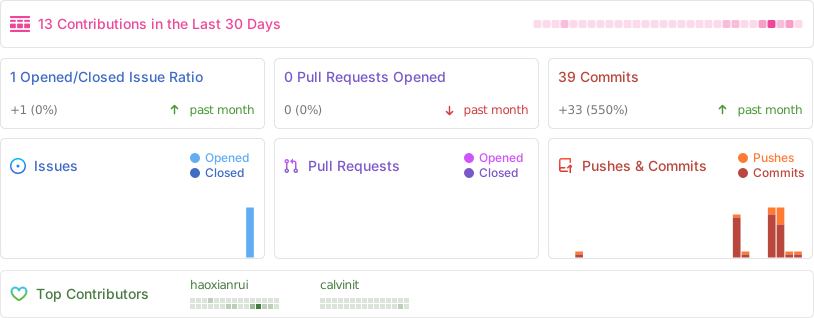
|
||
|
||
Thanks to all the contributors!
|
||
|
||
[](https://github.com/haoxianrui/youlai-boot/graphs/contributors)
|
||
|
||
## 💖 加交流群
|
||
|
||
① 关注「有来技术」公众号,点击菜单 **交流群** 获取加群二维码(此举防止广告进群,
|
||
感谢理解和支持)。
|
||
|
||
② 直接添加微信 **`haoxianrui`** 备注「前端/后端/全栈」。
|
||
|
||

|