
98 lines
2.5 KiB
Markdown
98 lines
2.5 KiB
Markdown
## 项目介绍
|
||
|
||
基于 uni-app + Vue 3 + TypeScript 移动端跨平台开发模板,集成了 ESLint、Prettier、Stylelint、Husky 和 Commitlint 等工具,确保代码规范与质量。
|
||
|
||
## 项目截图
|
||
|
||
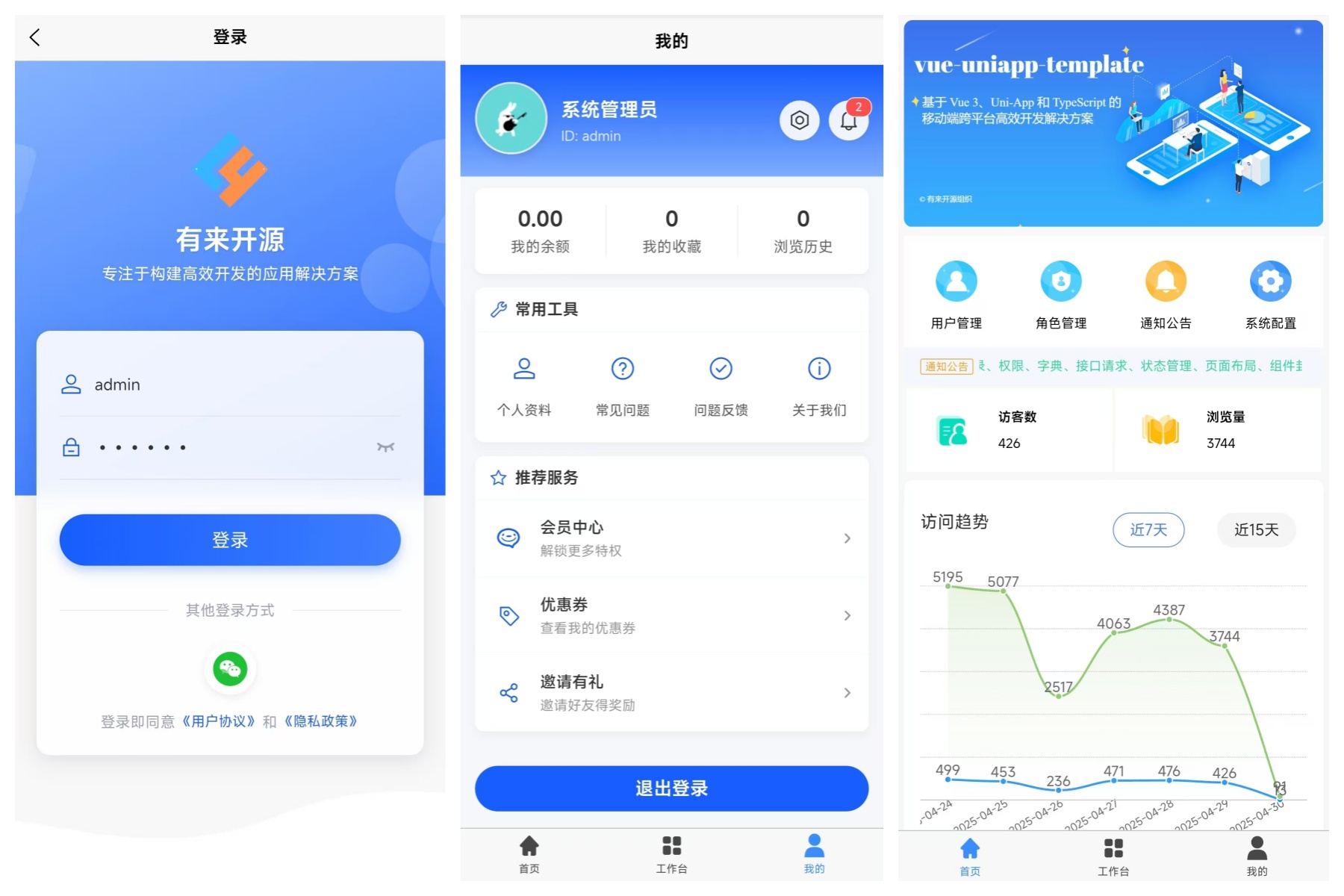
|
||
|
||
## 项目文档
|
||
|
||
[从0到1构建 UniApp + Vue3 + TypeScript 移动端跨平台开源脚手架](https://juejin.cn/post/7448963032993038376)
|
||
|
||
## 项目启动
|
||
|
||
### 安装依赖
|
||
|
||
```bash
|
||
pnpm install
|
||
```
|
||
|
||
### H5 启动
|
||
|
||
```bash
|
||
pnpm run dev:h5
|
||
```
|
||
|
||
访问 [http://localhost:4096](http://localhost:4096)
|
||
|
||
### 微信小程序启动
|
||
|
||
#### 1. 编译项目
|
||
|
||
```bash
|
||
pnpm run dev:mp-weixin
|
||
```
|
||
|
||
编译完成后,会在 `dist/dev/mp-weixin` 目录下生成微信小程序代码。
|
||
|
||
#### 2. 导入项目到微信开发者工具
|
||
|
||
- 打开**微信开发者工具**
|
||
- 点击 **"导入项目"**
|
||
- 选择项目根目录下的 `dist/dev/mp-weixin` 文件夹
|
||
- 填写 AppID(没有可以选择测试号)
|
||
|
||
#### 3. 配置微信开发者工具(⚠️ 重要)
|
||
|
||
在微信开发者工具中,点击右上角的 **"详情"** → **"本地设置"**,确保以下配置:
|
||
|
||
- ✅ **不校验合法域名、web-view(业务域名)、TLS 版本以及 HTTPS 证书** - 必须勾选(开发环境)
|
||
- ✅ **ES6 转 ES5** - 建议勾选
|
||
- ❌ **过滤无依赖文件** - **必须取消勾选**(否则会导致组件无法加载)
|
||
- ❌ **上传时过滤无依赖文件** - 建议取消勾选
|
||
|
||
#### 4. 首次运行或遇到组件加载问题
|
||
|
||
如果遇到组件无法加载或页面报错,请执行以下操作:
|
||
|
||
1. **清除缓存**:点击菜单 `工具` → `清除缓存` → `全部清除`
|
||
2. **重新编译**:点击工具栏的 **"编译"** 按钮
|
||
3. **重新载入项目配置**:点击菜单 `项目` → `重新载入项目配置`
|
||
|
||
如果问题依然存在,尝试:
|
||
|
||
- 关闭微信开发者工具
|
||
- 重新打开并导入项目
|
||
|
||
## 组件结构
|
||
|
||
项目组件分为以下几类:
|
||
|
||
- **基础组件**:`src/components` 下的通用组件
|
||
- **业务组件**:`src/components/business` 下的业务相关组件
|
||
- `WechatProfile.vue`: 微信小程序环境下的头像、昵称和性别选择组件
|
||
|
||
使用业务组件:
|
||
|
||
```vue
|
||
<template>
|
||
<WechatProfile v-model="profileData" @change="onProfileChange" />
|
||
</template>
|
||
|
||
<script lang="ts" setup>
|
||
import { ref } from "vue";
|
||
import { WechatProfile } from "@/components/business";
|
||
|
||
const profileData = ref({
|
||
avatar: "",
|
||
nickname: "",
|
||
gender: 1,
|
||
});
|
||
|
||
const onProfileChange = (data) => {
|
||
console.log("个人资料变更:", data);
|
||
};
|
||
</script>
|
||
```
|